
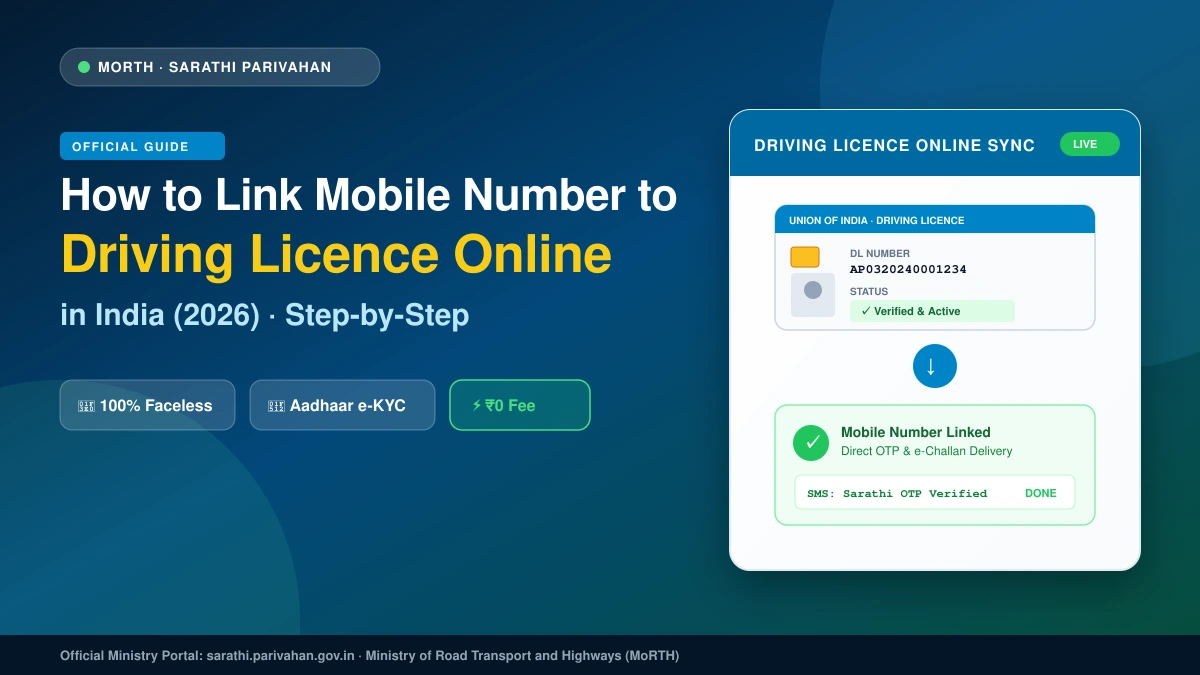
1. Service Summary (Purpose, Official URL, Fees & Processing Time)
Updating your active mobile number in your Driving Licence (DL) record is mandated by MoRTH under the Central Motor Vehicles Rules. Linking your phone ensures instant delivery of electronic challan (e-challan) alerts, renewal notices, and OTPs required for downloading digital licences into DigiLocker and mParivahan.
Vehicle registration (RC) contact updates are managed on Vahan, while driving licence and learner permit contact updates are handled exclusively on Sarathi Parivahan.
| Parameter | Official Detail |
|---|---|
| Service Name | Mobile Number Update (Driving Licence) |
| Issuing Authority | Ministry of Road Transport & Highways (MoRTH) / State Transport Departments |
| Official Portal | Sarathi Parivahan (sarathi.parivahan.gov.in) |
| Direct URL | https://sarathi.parivahan.gov.in/sarathiservice/mobNumUpdpub.do |
| Government Fee | ₹0 (Free Public Service) |
| Mode of Service | 100% Faceless / Online (No RTO visit required) |
| Authentication | UIDAI Aadhaar e-KYC (OTP) |
| Processing Time | Instant on-screen confirmation; 15–30 minutes for mParivahan/DigiLocker sync |
| Applicable To | Learner Licence (LL), Driving Licence (DL), and Conductor Licence (CL) holders |
2. Mandatory Prerequisites & Document Checklist
No physical documents or scans are required. Have the following details ready:
- Driving Licence Number: Standard 15-character format:
[State Code: 2 letters] + [RTO Code: 2 digits] + [Year: 4 digits] + [7-digit DL Number](e.g.,AP0320240001234). - Date of Birth: Must match your DL and Class 10 certificate (
DD-MM-YYYY). - Last Transaction State: The State/UT where your licence was issued or last renewed.
- 12-Digit Aadhaar Number / 16-Digit VID: Registered to the licence holder.
- Aadhaar-Linked Active Mobile: Must be active to receive the UIDAI authentication OTP.
- New Mobile Number: An active 10-digit number ready to receive the final confirmation OTP.
- Browser: Google Chrome, Firefox, or Edge on desktop or mobile.
3. Step-by-Step Online Portal Walkthrough
Step 3.1: Open the Parivahan Sewa Portal
Go to https://parivahan.gov.in/. When the “Update Your Mobile Number” advisory popup opens, click the Sarathi button or scan the Sarathi QR code to open the DL mobile update screen directly.
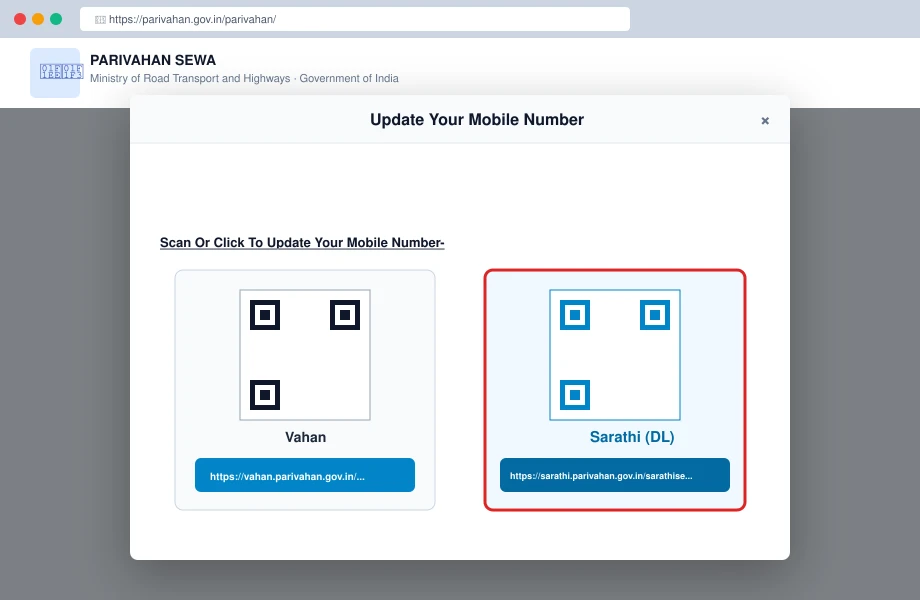
Parivahan Sewa advisory popup highlighting the Sarathi QR code and direct URL for Driving Licence contact updates.
Step 3.2: Enter Driving Licence Details
On the Mobile Number Update page:
- Enter your DL Number without spaces or slashes.
- Enter your Date of Birth (
DD-MM-YYYY). - Select your DL Holder’s Last Transaction State from the dropdown.
- Enter the case-sensitive Captcha and click Submit.
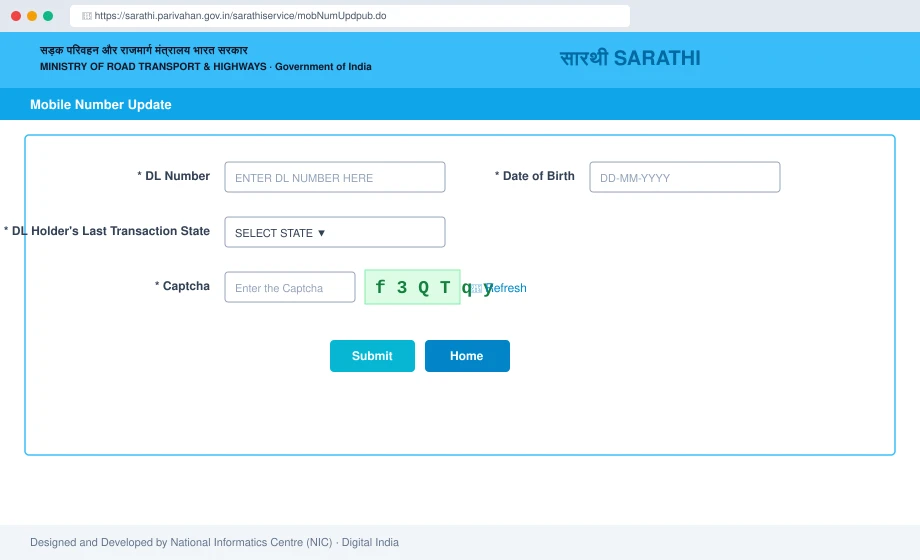
Initial verification screen on Sarathi: Enter DL number, Date of Birth, Last Transaction State, and security captcha.
Step 3.3: Aadhaar e-KYC Authentication
- Select the Aadhaar number option and enter your [12-Digit Aadhaar Number].
- Click Generate OTP. UIDAI will send a 6-digit code to your Aadhaar-registered mobile.
- Check all three statutory consent boxes.
- Enter the OTP in the Enter OTP Here field and click Authenticate.
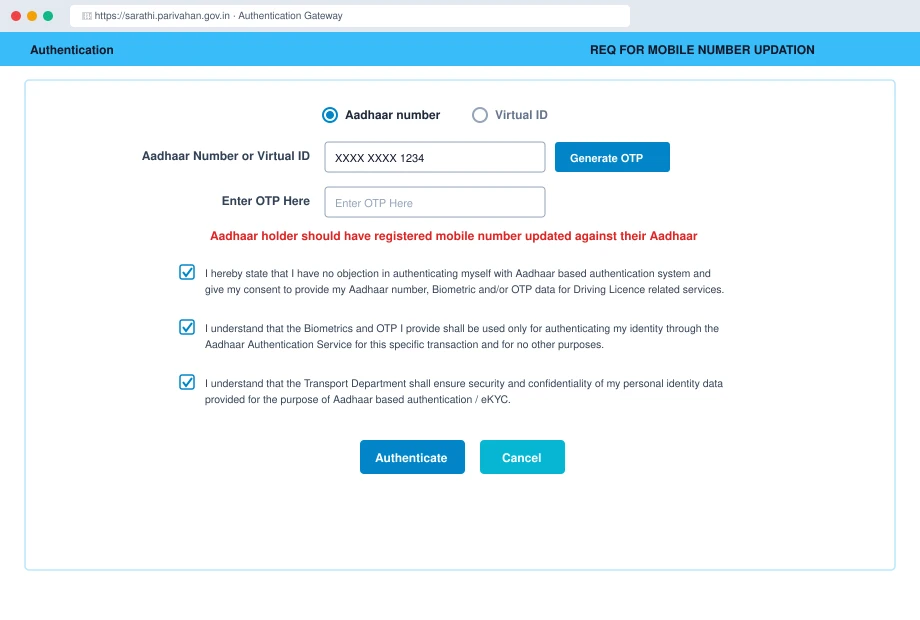
REQ FOR MOBILE NUMBER UPDATION — Aadhaar authentication screen with OTP generation and consent declarations.
Step 3.4: Review Demographic & License Details
- Review your Aadhaar-verified demographic details (Name, Relation, DOB, Address). Click Proceed.
- The portal displays your License Holder Details along with your existing masked phone number (
9*8*X*X*1*2). Click Proceed.
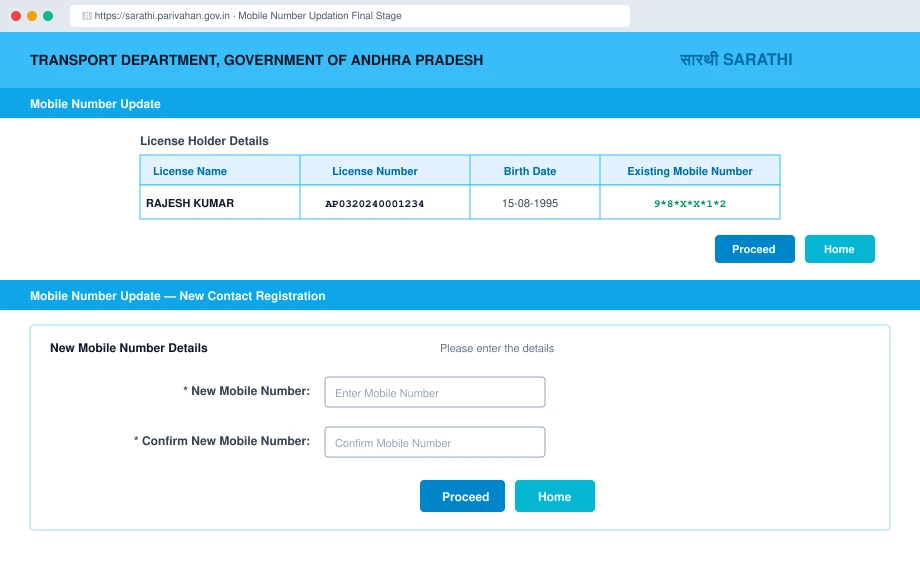
License Holder details summary table showing masked existing phone number, followed by the New Mobile Number entry fields.
Step 3.5: Enter New Mobile Number & Confirm OTP
- Under New Mobile Number Details, enter your active 10-digit number.
- Re-enter the number in Confirm New Mobile Number and click Proceed.
- Enter the 6-digit OTP received on your new mobile number and click Submit.
- The screen displays: “Successfully Updated Mobile Number for Driving Licence [DL Number]”. Download or save the acknowledgement receipt.
4. Portal Error Troubleshooting & Glitch Fixes
- Aadhaar Name / DOB Mismatch: If your Aadhaar details differ from your DL records, e-KYC will fail. Submit an online “Change of Name/DOB in DL” on Sarathi with your Class 10 certificate before linking your phone.
- Aadhaar OTP Not Arriving: Wait 120 seconds before retrying. Check that your number is active on UIDAI (
myaadhaar.uidai.gov.in). If changed, update it first at an Aadhaar Seva Kendra. - Invalid DL Number / Record Not Found: Use the standard 15-character format:
[State: 2][RTO: 2][Year: 4][7-digit sequence]. Pad short numbers with leading zeroes (e.g.,452becomes0000452). - Session Expired / Token Error: Complete the flow within 5 minutes. If it times out, clear browser cookies or open an Incognito window.
5. Tracking Application Status (SRN / URN & mParivahan)
- Via Sarathi Portal:
- Open
https://sarathi.parivahan.gov.in/and select your State. - Click Application Status from the top menu.
- Enter your Application Number (from the receipt), Date of Birth, and Captcha, then click Submit.
- Open
- Via mParivahan App:
- Open the mParivahan app and sign in with your updated mobile number.
- Go to My Virtual DL, enter your DL Number and DOB, and request an OTP. Receiving the OTP on your new SIM confirms live database sync.
6. Digital Driving Licence Legal Validity & Password Rules
- Legal Validity: Under Rule 139 of the Central Motor Vehicles Rules, 1989, and Section 4 of the IT Act, 2000, digital licences in mParivahan and DigiLocker have equal legal standing to physical smart cards and must be accepted by traffic police across India.
- Receipt PDF Password: If your downloaded acknowledgment receipt or DL extract is password-protected, the password is your Date of Birth in 8 digits (
DDMMYYYY) without slashes or spaces (e.g.,15081995).