
You can apply for a learner’s licence (LL) online on Sarathi, the government’s Parivahan Sewa portal. Pick your state, fill in Form 1, attach the medical form if your category needs it, pay the fee shown, book and pass the LL test, and print the licence. The LL is valid for six months and you must hold it for at least 30 days before the driving test. Details such as the fee amount, the test mode and the Aadhaar option vary by state, so the portal’s own screens decide the final answer.
Official portal: Sarathi, State Selection · Next step after the LL: Driving Licence Services
On this page: Age rules · Documents · Steps · Test tips · Timeline example · Problems · Official sources
Check your age and vehicle class first
Choosing the wrong class is the easiest mistake to make, and it costs you a fee and time. The Motor Vehicles Act sets these age limits:
| What you want to drive | Minimum age | Extra condition |
|---|---|---|
| Motorcycle up to 50cc | 16 years | Your state may ask for a guardian’s consent |
| Any other motor vehicle, such as a geared motorcycle or a car (light motor vehicle) | 18 years | None |
| Transport vehicle | 20 years | An LL for a transport vehicle needs a licence for a light motor vehicle held for at least one year |
Your birth date decides it. If you turn 18 next month, wait: applying early for an 18-plus class will be rejected.
What to keep ready
The exact document list is shown after you choose your state and class. In general, have these ready as clear scans or photos:
- Proof of age, such as a birth certificate or school leaving certificate.
- Proof of identity and address, such as Aadhaar or any document your state lists.
- A passport-size photograph and your signature, if the portal asks for them.
- Form 1, a self-declaration of physical fitness.
- Form 1A, the medical certificate. Sarathi’s FAQ says Form 1 should be attached with Form 1A.
Name, date of birth and address should read the same in every document and in the form. If they don’t, fix the source document first.
Apply on Sarathi, step by step
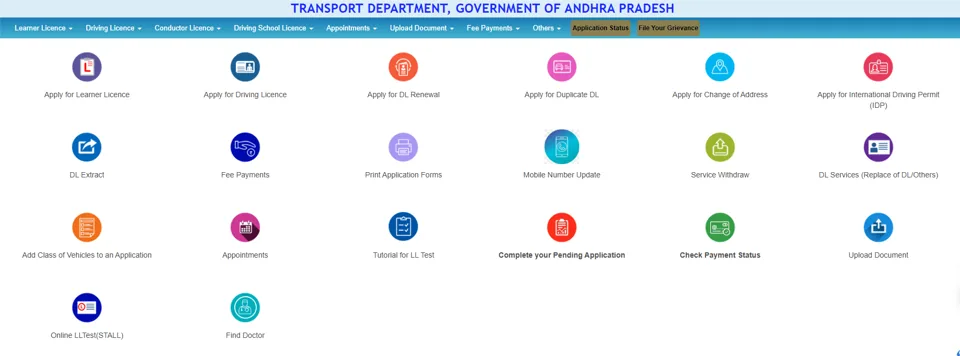
Labels can change a little from state to state. The screenshots below are from the Andhra Pradesh Sarathi page, taken in August 2026.
- Open sarathi.parivahan.gov.in and choose your State or UT. The page header then shows your state’s transport department.
- On the state’s home page, click Apply for Learner Licence. It is the first tile. The same service is also in the Learner Licence menu at the top.
-
On the Application for Learner’s Licence (LL) screen, pick the option that matches you, then click Submit:
- Applicant does not hold any Driving/Learner licence issued in India: the default, for a first-time applicant.
- Applicant holds Driving Licence: you already have a DL and want an LL for another vehicle class.
- Applicant holds Learner Licence: you already have an LL.
The Select Category if required box is optional. Leave it on “Select” unless your situation fits one of the listed categories.

- Read the state instructions on the next screen. They tell you whether you can use Aadhaar authentication, and whether the test happens online or at an RTO.
- Fill in the form: name, birth date, parent or guardian, address, contact details and the vehicle class. Check the class twice.
- Upload the requested documents and complete the Form 1 and Form 1A step. If you leave midway, the Upload Document and Complete your Pending Application tiles let you continue later.
- Pay the fee through Fee Payments. The payment page shows the total for your state and class, so pay only that amount and save the receipt. If the money is debited but nothing shows, use Check Payment Status before paying again.
- Book your LL test slot under Appointments, or take the test online through Online LLTest (STALL) if your state allows it.
- Take the test. After you pass, use the Print option in the Learner Licence menu to get your licence.
The same page also has Tutorial for LL Test, for practice, and Find Doctor, for finding a doctor registered on the portal. It’s handy if you need someone to sign your Form 1A medical certificate.
If you lose track of an application, the portal has an application status option. Sarathi’s FAQ lists the application status path under Apply Online. Keep the printed acknowledgment, Form 1, Form 1A, appointment letter and fee receipt together. These are the papers the FAQ asks you to print.
The portal lets you edit an application before the fee is paid, so check every field before paying.
Preparing for the LL test
The Learner Licence section has a tutorial for the LL test, mock tests and sample questions. Use them. Most people lose marks on road signs and give-way rules, not on difficult questions. Practise a few mock tests, and take at least one on the same device and internet connection you’ll use for the real test if your state offers it online.
If you fail, you pay a retest fee and book a new slot. If you miss your slot altogether, book a new appointment under Appointments, then the Learner’s licence test link. Nobody can guarantee a pass, so do not pay anyone offline for one.
Your timeline, with an example
Two dates matter: 30 days and 6 months.
| Date | What it means |
|---|---|
| Issue date | The day your LL is issued. Suppose this is 10 January 2026 |
| 30 days later | Earliest day you can appear for the driving test. For 10 January, that is 9 February |
| Six months later | The LL stops being valid, around 10 July in this example |
So you have a driving-test window between the two dates. Book your driving test slot well before the end, because slots can fill up. If the LL lapses, Sarathi offers an Expired Learner Licence Issue Again service, but it is simpler not to let it expire.
While you practise, follow the conditions printed on your LL and your state’s rules.
Common problems
| Problem | What to try |
|---|---|
| Page will not load | Use Chrome or Edge, clear the cache, try off-peak hours, and check the address shows sarathi.parivahan.gov.in |
| Upload fails | Reduce the file size, use a format the portal accepts, and check the text is readable |
| Aadhaar step fails | Retry later. If your state offers a without-Aadhaar path, it may need an RTO visit |
| No test slots | Check again on another day under LL Test Slot Booking |
| Wrong class or birth date after paying | Edit it before paying if you can; after payment, ask your RTO |
| Cannot find your LL to print | Use the print or application status option with the application number and birth date |
Your Aadhaar details can matter here. If your Aadhaar mobile number is wrong, see how to update it, and you can download your Aadhaar for the application.