Verify Aadhaar Email / Mobile Number Online 2026 — UIDAI myAadhaar

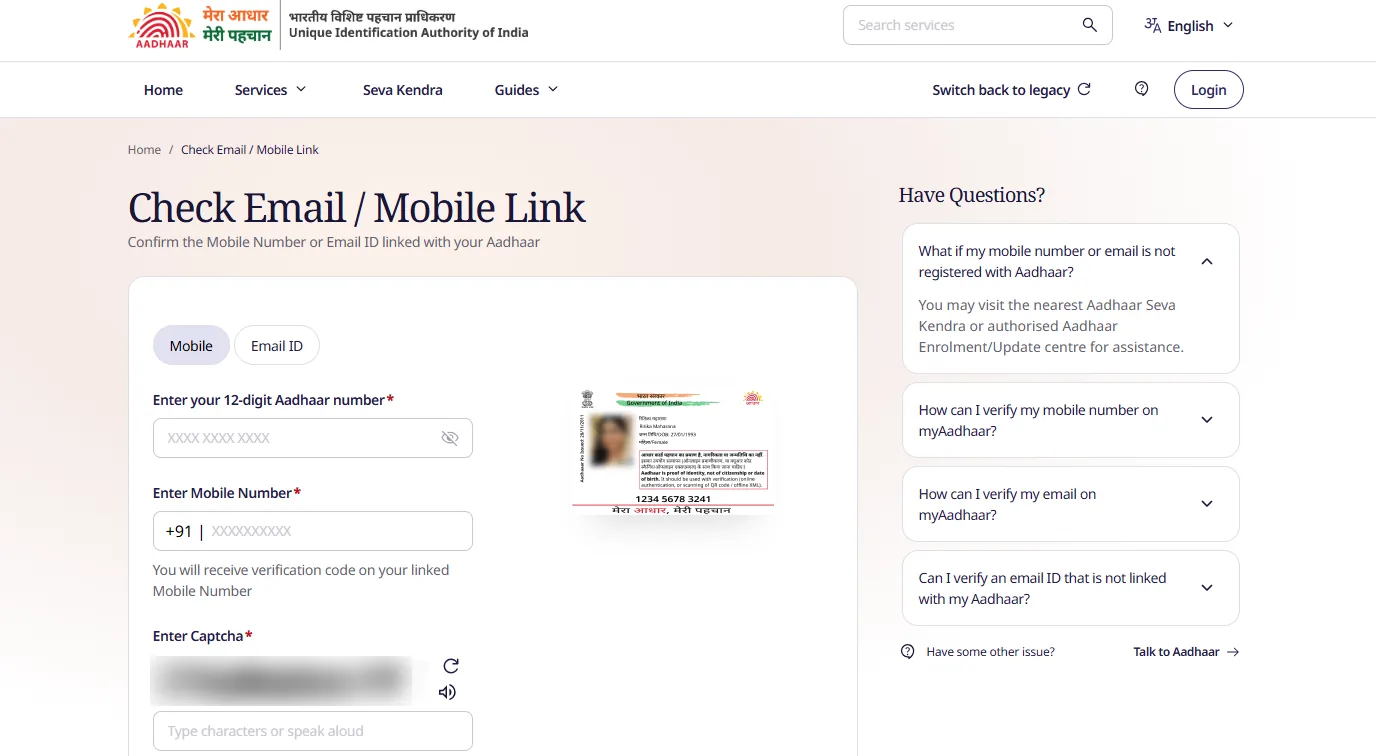
Verify Aadhaar email / mobile number online free on the official UIDAI myAadhaar portal. Confirm whether a specific mobile number or email ID is registered with your Aadhaar before you try OTP login, eAadhaar download, bank KYC, or SIM linking.

This SEO guide targets: verify mobile number with Aadhaar, is my mobile linked with Aadhaar, verify email with Aadhaar, Aadhaar email verification online, check registered mobile Aadhaar, UIDAI verify email mobile, and myaadhaar verify-email-mobile.

Service: Verify Email / Mobile with Aadhaar · Direct link: verify-email-mobile (official) · Hub: Aadhaar Services · Related: Know mobile / validity · Update mobile

Verify Aadhaar Email / Mobile — Quick Overview

Detail Information
Service Verify Email / Mobile Number
Authority UIDAI
Direct official URL https://myaadhaar.uidai.gov.in/verify-email-mobile/en
What you check Whether a mobile or email is linked to your Aadhaar
What you need 12-digit Aadhaar + mobile or email to test + captcha
Fee Free
If not linked Update mobile · Update email

What Is “Verify Email / Mobile Number”?

UIDAI’s Verify Email/Mobile Number service lets residents confirm the contact details declared at enrolment or last update:

  • Verify mobile number — enter a SIM number and see if it is the one registered on Aadhaar
  • Verify email ID — enter an email and see if it is registered on Aadhaar

Official description (UIDAI services): you can verify the email address and mobile number declared at enrolment or during the latest Aadhaar detail update.

Service Purpose Official page
Verify Email / Mobile Is this mobile/email linked? verify-email-mobile/en
Check Aadhaar validity / know mobile Is Aadhaar valid? Masked registered mobile check-aadhaar-validityguide
Mobile update Change registered mobile guide
Email update Change registered email guide
Update status (SRN) Track update request guide
Download eAadhaar Get PDF after OTP guide

Bookmark this page only:

https://myaadhaar.uidai.gov.in/verify-email-mobile/en

  • Domain: myaadhaar.uidai.gov.in
  • Path: /verify-email-mobile/en
  • Also listed under UIDAI My Aadhaar → Aadhaar Services → Verify Email/Mobile Number

Free UIDAI service — confirm registered mobile or email on official myAadhaar only

✅ Verify Aadhaar Email / Mobile (Official UIDAI) myAadhaar Home

How to Verify Mobile Number Linked with Aadhaar (Step by Step)

Keywords: how to check mobile number linked with Aadhaar · verify SIM with Aadhaar online · is my phone number registered with Aadhaar

  1. Open https://myaadhaar.uidai.gov.in/verify-email-mobile/en.
  2. Choose Verify Mobile Number (or the mobile option shown on screen).
  3. Enter your 12-digit Aadhaar number.
  4. Enter the mobile number you want to test (10-digit Indian mobile).
  5. Enter captcha / security code.
  6. Click Proceed / Submit.
  7. Read the result: linked / registered or not linked (wording as on the live page).
  8. If linked, that SIM should receive Aadhaar OTPs.
  9. If not linked, update mobile and re-verify before critical services.

Exact button labels can change when UIDAI updates myAadhaar — follow the on-screen text.

How to Verify Email ID Linked with Aadhaar

Keywords: verify email with Aadhaar · Aadhaar registered email check · is email linked to Aadhaar

  1. Open the same page: verify-email-mobile/en.
  2. Choose Verify Email / email option.
  3. Enter Aadhaar number.
  4. Enter the email address to check.
  5. Complete captcha and submit.
  6. Confirm whether that email is registered.
  7. If not, use Aadhaar email ID update at a centre or online if offered.

Why Verify Email & Mobile Before OTP Services?

Situation Why verification helps
Download eAadhaar OTP goes only to registered mobile
Lock / unlock biometrics Needs registered contact OTP
New SIM / dual number Confirm which number is still linked
Bank / DBT / DigiLocker Many flows assume correct Aadhaar mobile
Email alerts Know if UIDAI has your current email

If Verification Fails (Mobile or Email Not Linked)

  1. Double-check Aadhaar digits and the mobile/email typed (no spaces/typos).
  2. Try know mobile / Aadhaar validity to see masked registered mobile.
  3. Update contact details:
  4. After update, track SRN status.
  5. Re-run verify email/mobile, then download eAadhaar.
Resource Link
Verify Email / Mobile verify-email-mobile/en
Check Aadhaar validity check-aadhaar-validity/en
myAadhaar home myaadhaar.uidai.gov.in
UIDAI Aadhaar services uidai.gov.in My Aadhaar
Download eAadhaar genricDownloadAadhaar

Security Tips

  • Use only https://myaadhaar.uidai.gov.in
  • Never share Aadhaar + OTP with WhatsApp agents
  • Verification is free — ignore paid “link check” apps
  • Prefer private device when entering Aadhaar
  • After public PC use, clear browser form data

Disclaimer

EasyApplications.in is independent and not affiliated with UIDAI. Portal labels and OTP steps can change; always follow the live myAadhaar screen. This is an original SEO guide for verify Aadhaar email and mobile, not copied from third-party portals.


Summary: To verify mobile number or email linked with Aadhaar, open myaadhaar.uidai.gov.in/verify-email-mobile/en, enter Aadhaar + contact + captcha, and confirm linkage. Free official UIDAI service. If not linked, update mobile or email and try again.

Frequently Asked Questions

How do I verify if my mobile number is linked with Aadhaar?

Open the official UIDAI page https://myaadhaar.uidai.gov.in/verify-email-mobile/en, choose verify mobile, enter your 12-digit Aadhaar number, the mobile number you want to check, and captcha, then proceed. The portal confirms whether that mobile is registered with your Aadhaar.

How do I verify email ID linked with Aadhaar?

On the same Verify Email/Mobile page, select verify email, enter Aadhaar and the email address to check, complete captcha, and submit. UIDAI shows whether that email is registered with the Aadhaar.

What is the direct link to verify Aadhaar email or mobile?

https://myaadhaar.uidai.gov.in/verify-email-mobile/en — always use myaadhaar.uidai.gov.in. Do not use third-party “Aadhaar mobile check” apps that ask for OTP on unknown sites.

Is verify Aadhaar mobile number free?

Yes. Verifying registered mobile or email on official myAadhaar is free. Never pay agents only to check if a number is linked.

What is the difference between verify email/mobile and check Aadhaar validity?

Check Aadhaar validity confirms the Aadhaar is valid and may show a masked registered mobile. Verify Email/Mobile lets you type a specific mobile or email and check if that contact is registered with your Aadhaar. Use both when needed.

What is the difference between verify mobile and update mobile?

Verify only confirms linkage. To change the registered number you must use Aadhaar mobile number update online or at an Aadhaar Seva Kendra with biometrics if the old SIM is lost.

Why should I verify mobile before downloading eAadhaar?

eAadhaar download and many Aadhaar services send OTP only to the registered mobile. Verifying first avoids failed OTP attempts with a wrong SIM.

Can I verify someone else’s mobile against my Aadhaar?

You can only check whether a number you enter is linked to the Aadhaar you enter. Use only your own Aadhaar. Sharing Aadhaar numbers carelessly is unsafe.

Portal says mobile is not linked — what next?

Update the mobile number on Aadhaar (online if available, or at Aadhaar Seva Kendra). After successful update, verify again and then try eAadhaar download or other OTP services.

Do I need OTP to verify email/mobile on myAadhaar?

The usual flow asks for Aadhaar, the mobile/email to verify, and captcha. Exact steps follow the live form; some screens may send OTP to the registered contact as UIDAI configures the service. Follow only the official page prompts.

Can I verify Aadhaar email/mobile on mAadhaar app?

mAadhaar is the official mobile app for Aadhaar services after setup. For browser verification, use myaadhaar.uidai.gov.in/verify-email-mobile. Prefer only official UIDAI app and website.

Is verify email/mobile the same as Aadhaar–PAN link check?

No. Email/mobile verification is a UIDAI myAadhaar service. Aadhaar–PAN linking status is on the Income Tax e-Portal.

← All Aadhaar Services