
Form 6 is the application to put your name on the electoral roll for the first time. You qualify if you are an Indian citizen who turns 18 on one of the Election Commission’s qualifying dates, and you apply where you ordinarily live. You attach proof of age, proof of address and a photograph. After verification you are on the roll and can get an EPIC, the voter card. This page covers who should use the form, what documents the form lists, and what to avoid.
Who should file Form 6
The declaration on the form asks you to state that you are applying for inclusion in the electoral roll for the first time, and to say how long you have lived at your address. That points to the right use: new voters, and citizens who have never been enrolled.
Do not file it if you are already on a roll. The Election Commission uses separate forms for corrections to an existing entry and for deletion. Searching the roll first takes a minute and avoids a duplicate. Our guides on searching the voter list, Form 8 corrections and shifting to a new address cover those cases.
Age and qualifying dates
The Election Commission amended its rules so there are four qualifying dates in a year, not one. A young person can be enrolled if they turn 18 on 1 January, 1 April, 1 July or 1 October. People who are 17 can submit an advance application, and they are added once they reach 18 rather than waiting for the next January.
So a person who turns 18 on 20 May does not have to wait until next year. The qualifying date after the birthday is 1 July, and that is the quarter they are enrolled in.
Documents the form lists
The Form 6 PDF names accepted documents. These are the ones it lists:
| Purpose | Documents listed on the form |
|---|---|
| Date of birth | Birth certificate from the local authority or registrar, Aadhaar, PAN, driving licence, Class 10 or 12 certificate showing date of birth, Indian passport |
| Address | Utility bill (water, electricity, gas) at least a year old, Aadhaar, current bank or post office passbook, Indian passport, revenue records, registered rent agreement, registered property deed |
The same document can serve for both purposes where the form allows it. Aadhaar and the passport appear on both lists.
If none of these exist, the guidelines say another document may be submitted, and the applicant may have to appear in person before the Electoral Registration Officer. Homeless people have separate provisions in the guidelines.
Photograph
The guidelines ask for a recent, good quality, unsigned colour photograph, 4.5 cm by 3.5 cm, on a white background, with the eyes open and the edges of the face clearly visible. A group photo, a heavily edited picture or a scan of an old ID is the kind of thing that stops an application.
Applying
The Election Commission’s online service is the ECINET Citizen Service Portal. Its home page has a Forms panel and a Services panel, and you can sign up or log in from the top right.
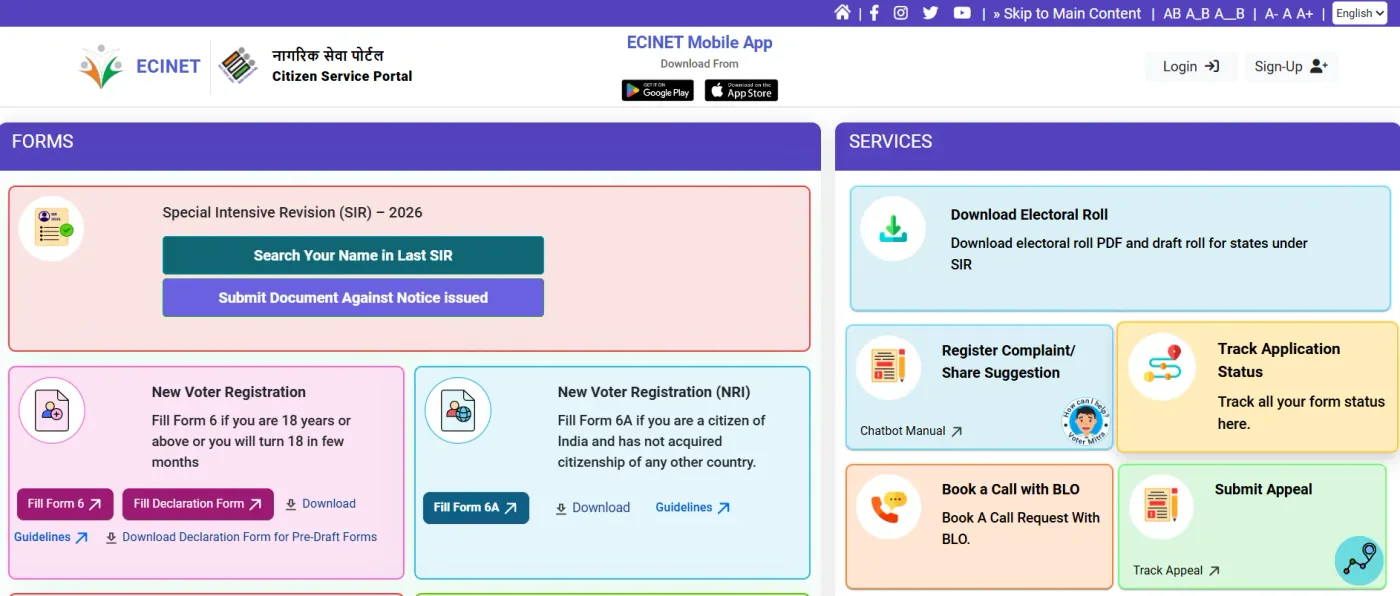
The ECINET home page as it appeared on 5 October 2026. The pink New Voter Registration panel is where Form 6 starts.
In the Forms panel, New Voter Registration carries the line “Fill Form 6 if you are 18 years or above or you will turn 18 in few months.” Under it are buttons for Fill Form 6, Fill Declaration Form, a Download link for the paper form and a Guidelines link. A separate panel, New Voter Registration (NRI), is for Form 6A, meant for a citizen of India who has not acquired citizenship of any other country.
A typical run, then:
- Open the portal and sign up or log in.
- Under New Voter Registration, choose Fill Form 6.
- Work through the form section by section, matching your documents.
- Attach the proofs and photograph, submit, and note down the reference number the portal shows. You will need it to track the application.
A paper Form 6 can still go to the Electoral Registration Officer, and the Download link gives you the form.
Inside the online Form 6
The form opens with the heading “Application Form for New Voters”, under Rules 13(1) and (26) of the Registration of Electors Rules, 1960, and is addressed to the Electoral Registration Officer. A Guidelines link and a language drop-down sit at the top. On the left is a Form Particulars list, and clicking a section jumps you to it.
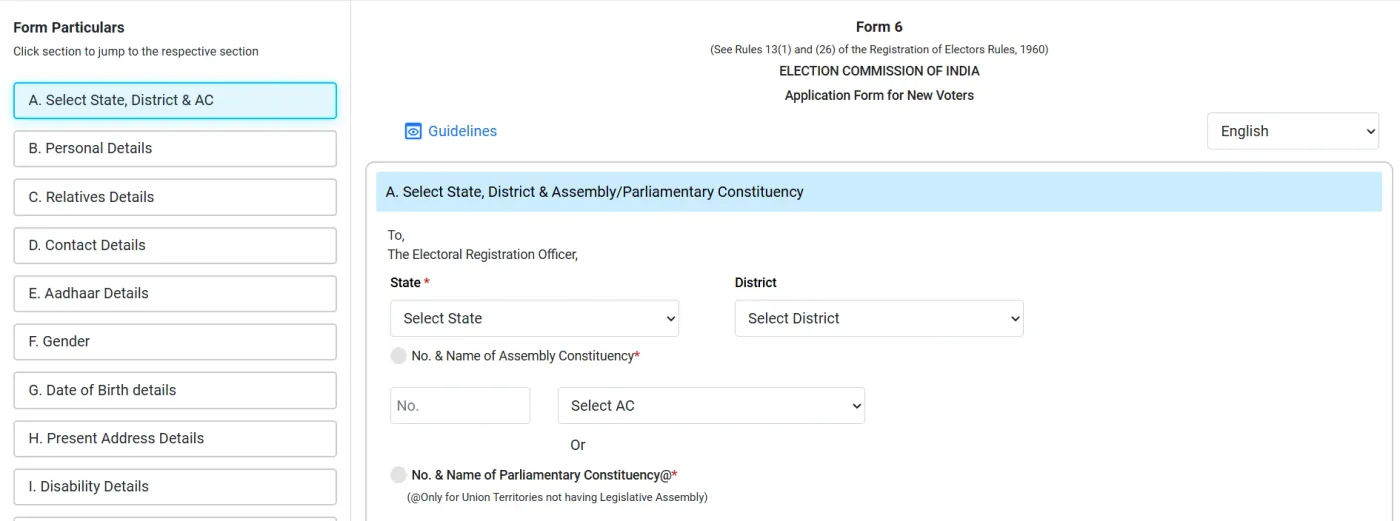
The online Form 6 as it appeared on 5 October 2026.
The sections listed on the left, in order, are:
- A. Select State, District and AC
- B. Personal Details
- C. Relatives Details
- D. Contact Details
- E. Aadhaar Details
- F. Gender
- G. Date of Birth details
- H. Present Address Details
- I. Disability Details
The list continues below section I, and those later sections were not on screen, so this page does not describe them.
Section A asks you to pick your State (marked required) and District. Then you identify the constituency in one of two ways: the number and name of your Assembly Constituency, which you can type as a number or choose from a list, or the number and name of a Parliamentary Constituency. The portal marks that second option for Union Territories that have no Legislative Assembly, so most applicants use the Assembly option.
Choose the constituency of the address where you ordinarily live, since that is what the form is asking about. If you do not know your assembly constituency, find it before you start.
The 2026 Special Intensive Revision panel
At the top of the Forms panel the portal also shows Special Intensive Revision (SIR) – 2026, with two buttons: Search Your Name in Last SIR and Submit Document Against Notice Issued. The Services panel adds Download Electoral Roll, described as the roll and draft roll for states under SIR. If you live in a state where an SIR is running, these are the buttons that apply to you, and a notice from your electoral office is the thing to respond to. Read the notice and the guidance on the portal for your state, because this page does not cover SIR rules.
After you submit
The Commission’s help material says that once the form and documents are in, a Booth Level Officer (BLO) may call or visit, and that if the form is accepted the card is delivered by the BLO or collected from the office. Be reachable at the address you gave. Registration happens through the annual revision, normally around September to October, and also through continuous updating during the year.
Tracking the application
Once you are logged in, the portal’s left-hand menu has Track Application Status. The screen is headed Track Your Application and asks for one thing: your Reference Number, followed by a Submit button. That number is the one the portal gave you when you submitted the form, so keep it somewhere safe.
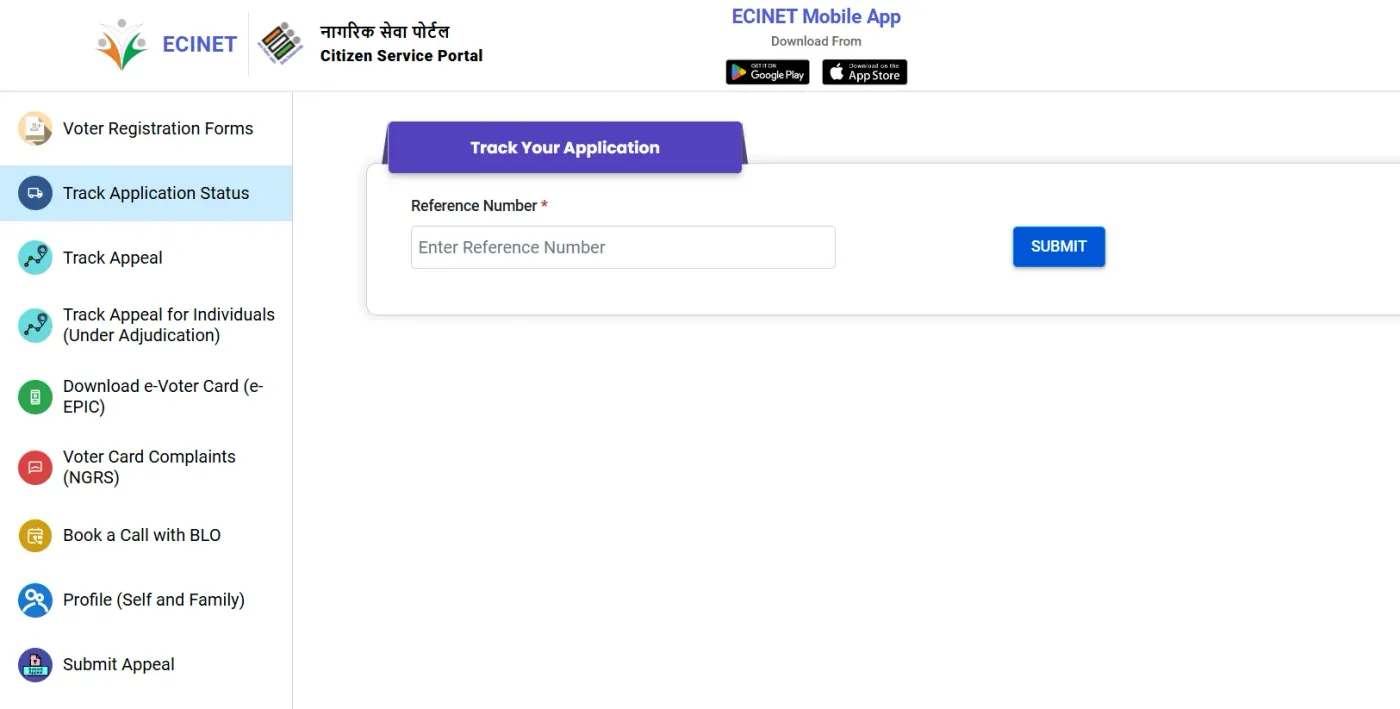
The tracking screen as it appeared on 5 October 2026.
The same menu lists the other services you may need after applying:
- Voter Registration Forms, to get back to the forms.
- Track Appeal and Track Appeal for Individuals (Under Adjudication), for appeals.
- Download e-Voter Card (e-EPIC). See our e-EPIC guide.
- Voter Card Complaints (NGRS), for complaints.
- Book a Call with BLO, to request a call from your Booth Level Officer.
- Profile (Self and Family).
- Submit Appeal, for decisions you want to contest.
The messages the tracker returns after you press Submit were not on screen, so this page does not list or explain them.
Common mistakes
- Filing Form 6 when your name is already on the roll under a parent’s address or an old spelling.
- Applying for a constituency where you do not ordinarily reside. The form asks how long you have lived at the address you give.
- Uploading a document that does not show the same address you wrote on the form.
- Spelling differences between the form and Aadhaar or school certificates.
- Losing the reference number.
- Paying an agent. The forms and guidelines mention no fee, and no agent can speed up verification.
Official sources
- Form 6 (ECI PDF)
- Guidelines for filling Form 6
- Voters’ Services Portal
- PIB: four qualifying dates and advance applications
- ECI help pages (SVEEP)
Form 6 and its guidelines were checked against the Election Commission’s documents on 5 October 2026, and the portal labels above are as shown on the ECINET home page that day. The later sections of the form, the upload and submission screens, and the messages the tracker returns were not reviewed. After you are enrolled see download e-EPIC and voter ID status check, or return to the Voter ID services hub.
EasyApplications.in is an independent information site and is not affiliated with the Election Commission of India. Confirm details on the official portal before you apply.