
Aadhaar OTPs go to one phone only: the mobile number linked to your Aadhaar. If OTPs stop arriving, or you have changed SIMs over the years, the first job is to work out which number that is.
The short answer: myAadhaar does not show you the full linked number. It lets you test a number. You type the number you think is linked, and UIDAI confirms whether it is. If you have used two or three SIMs, test each one.
We checked the page on the official portal on 7 October 2026. The screenshot is below, with the captcha blurred.
Free UIDAI check on myaadhaar.uidai.gov.in — no login needed.
Open myAadhaar — Official UIDAIStep by step
- Go to myaadhaar.uidai.gov.in and type “Check Email” in the Search services box to open Check Email / Mobile Link.
- Keep the Mobile tab selected.
- Enter your 12-digit Aadhaar number.
- Enter the mobile number you want to test (the +91 is already there).
- Type the captcha and continue.
- The page confirms whether that number is the one linked to your Aadhaar. If it is not, repeat with your next most likely number.
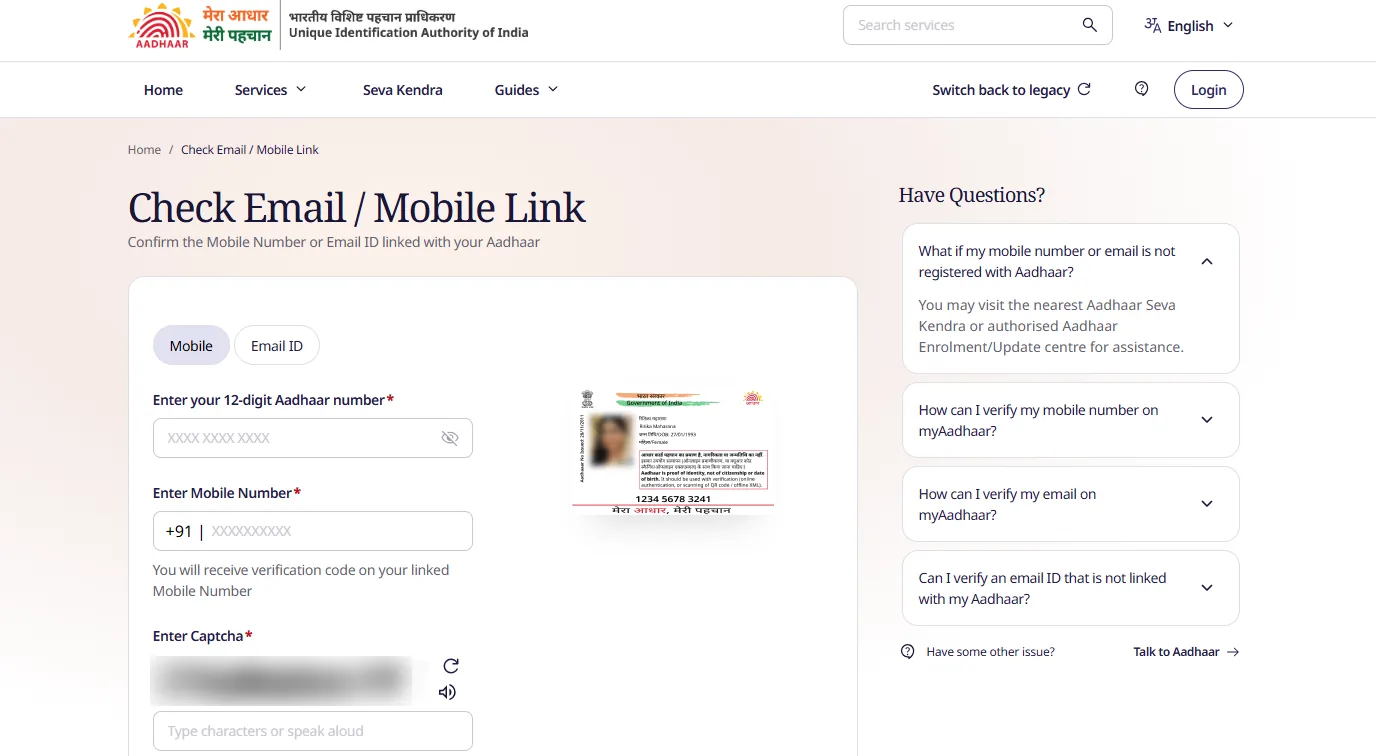
Check Email / Mobile Link on 7 October 2026. The card shown is UIDAI’s sample.
For a fuller walk-through of this page, including the Email ID tab, see Verify Aadhaar email or mobile.
Which number to try first
Most people find it within two tries if they go in this order:
- The number you had when you enrolled or last updated Aadhaar. That is the number UIDAI recorded, even if you no longer use it.
- The number your bank sends OTPs to. Banks often took it from Aadhaar during e-KYC.
- A family member’s number. Children’s and elderly relatives’ Aadhaar are often linked to a parent’s or child’s phone.
What your result means
| Result | What to do next |
|---|---|
| The number you typed is linked and you still have that SIM | You are fine. Use it for e-Aadhaar download, bank e-KYC and myAadhaar login |
| It is linked but the SIM is lost or switched off | Get a duplicate SIM from your operator if possible, or update the number at an Aadhaar centre |
| None of your numbers are linked | Link your current number at an Aadhaar Seva Kendra — see mobile number update |
UIDAI’s own answer on this page, for a number that is not registered, is: “You may visit the nearest Aadhaar Seva Kendra or authorised Aadhaar Enrolment/Update centre for assistance.”
Things to know
- The check changes nothing. It only tells you about the link; updating is a separate request.
- The code goes to the linked number. The page says: “You will receive verification code on your linked Mobile Number.”
- Don’t confuse it with “Check Aadhaar Status”. That tile on the new myAadhaar validates whether an Aadhaar number is active; it is not the mobile check.
- Do the check early. If you have a bank KYC or scholarship deadline, find out now. Updating a number at a centre takes time.
- Never pay for this. Apps and agents that offer to “find your Aadhaar mobile” for a fee are not needed — the UIDAI check is free.
Related Aadhaar guides
- Verify Aadhaar email or mobile
- Aadhaar mobile number update
- Download Aadhaar card online
- Check Aadhaar update status
- All Aadhaar services
Screenshot and steps checked on the official myAadhaar portal on 7 October 2026. Easy Applications is an independent site and is not affiliated with UIDAI. Edited by RAKESH.A.