
You can download your Aadhaar (many people spell it Aadhar) as a free PDF from UIDAI’s own website in about two minutes. All you need is your Aadhaar number, or a Virtual ID, and the phone that is linked to Aadhaar, because UIDAI sends a one-time password (OTP) to that phone. The PDF is password protected. The password is the first four letters of your name in capitals plus your birth year, for example SURE1990.
Official page: Download Aadhaar on myaadhaar.uidai.gov.in. It is free. Never share your OTP with anyone.
On this page: Which method should I use? · Before you start · Step by step on the website · Open the PDF · Full or masked copy · Phone not linked or OTP not coming · Other ways to get it · Avoid scams
Which method should I use?
Pick the row that matches your situation.
| Your situation | Best route | Why |
|---|---|---|
| I am at a computer or have a browser on my phone | UIDAI website (steps below) | No app needed, works with just OTP |
| I want to keep Aadhaar on my phone all the time | Aadhaar app | Also lets you share only some details, lock biometrics and track requests |
| I already use DigiLocker for other documents | DigiLocker | Aadhaar sits with your other documents. See our DigiLocker guide |
| I want a plastic card in my wallet | Order PVC card | Delivered by post. This is a separate paid service |
| My mobile number is not linked or I lost it | Update the number first | Every online route needs the OTP. See mobile number update |
Before you start
Keep these ready so the OTP does not expire while you hunt for something:
- The phone linked to your Aadhaar, switched on and with network. The OTP is sent only to that number.
- Your 12-digit Aadhaar number. If you only have your 16-digit Virtual ID (VID) or the Enrolment ID (EID) from your enrolment slip, UIDAI accepts those too.
- Your name and birth year exactly as printed on Aadhaar. You will need them to open the PDF.
- A safe place to save the file. Avoid cyber cafe or office computers, or delete the file when you are done.
If you do not remember your Aadhaar number, the same portal has a “Retrieve Lost or Forgotten EID/UID” service. It also sends the OTP to the registered mobile.
Step by step on the website
We went through these steps on the official portal on 7 October 2026. You do not need to log in to myAadhaar first; the download page works on its own.
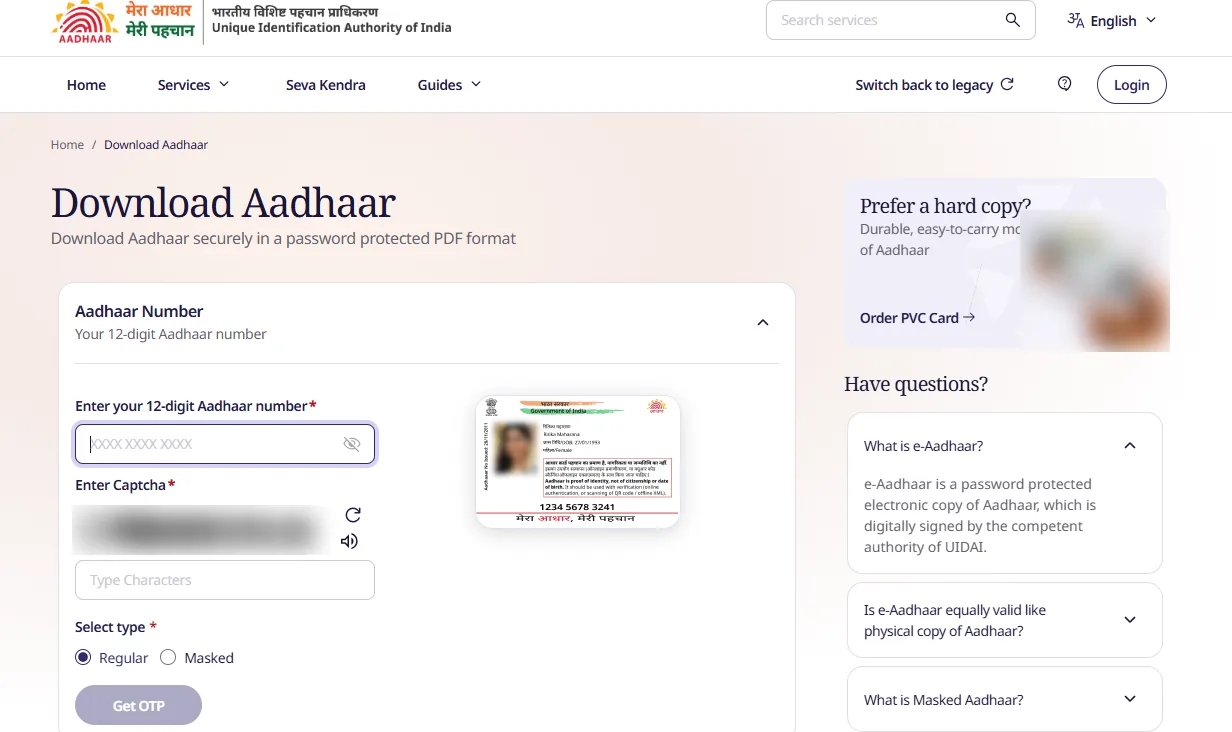
The Download Aadhaar page on 7 October 2026 (captcha blurred). The card in the middle is UIDAI’s own sample.
- Open myaadhaar.uidai.gov.in in your browser and check that the address ends in uidai.gov.in before typing anything. On the home page, type “Download Aadhaar” in the Search services box.
- The page is headed Download Aadhaar — “Download Aadhaar securely in a password protected PDF format”. The Aadhaar Number section is open by default. If you only have a VID or Enrolment ID, look for its section on the same page.
- In Enter your 12-digit Aadhaar number, type the number. The eye icon at the end of the box shows or hides what you typed, which is handy if someone is near your screen.
- Type the captcha in the Type Characters box. Use the refresh icon for a new one, or the speaker icon to hear it.
- Under Select type, choose Regular (full number) or Masked (only the last four digits). Regular is selected by default, so change it now if you want a masked copy. See full or masked below.
- Press Get OTP. The button stays greyed out until the number and captcha are filled in. The OTP goes to the mobile linked to your Aadhaar.
- Enter the OTP and confirm. The PDF downloads to your phone or computer.
- Open the file with the password described next.
If you are already logged in to myAadhaar, the dashboard has a Download Aadhaar card — “Download digitally signed and password protected electronic copy” — that leads to the same service.
How to open the Aadhaar PDF
UIDAI protects the downloaded file with a password. The rule is the first four letters of your name in capital letters followed by your year of birth as four digits.
| Name on Aadhaar | Year of birth | Password |
|---|---|---|
| Suresh Kumar | 1990 | SURE1990 |
| Anitha Reddy | 1985 | ANIT1985 |
| Ravi Teja | 2001 | RAVI2001 |
Common reasons the password fails:
- Using your name as you spell it, not as Aadhaar prints it. If Aadhaar says “Sureshkumar” or has an initial first, such as “K Suresh”, the first four letters come from that exact text. Check your name on the Aadhaar itself.
- Small letters. The four letters must be capitals.
- Using the full birth date. Only the year is needed, not day and month.
- A very short first name. If your name has fewer than four letters, UIDAI’s page shows how it handles that case. Check the hint on the download page rather than guessing.
If it still does not open, download the file again from the official page and retry. Do not install a “PDF unlocker” to remove the password.
Full Aadhaar or masked Aadhaar?
A masked Aadhaar hides the first digits of your 12-digit number and shows only the last four. Everything else on the document stays as usual: name, photo, address, and QR code. On the download page this is the Masked option under Select type; the page’s own help panel also has a “What is Masked Aadhaar?” answer.
| Full copy | Masked copy | |
|---|---|---|
| Shows | The full 12-digit number | Only the last 4 digits |
| Good for | Bank account opening, KYC, SIM, anything that must record the number | Hotel check-in, shop or landlord copies, forms that only need identity or address |
| Risk if lost | Higher: the full number is exposed | Lower |
A good habit: download both once, keep the full copy private, and hand out the masked one when the full number is not required. If an organisation insists on the full number, that is their call, but ask why before giving it.
The Aadhaar app can also share only the details you choose, along with your photo, which is safer than sending the whole PDF.
Phone not linked or OTP not coming
This is where most people get stuck, so here is what to try in order.
| What you see | What to do |
|---|---|
| OTP does not arrive | Wait a minute, check network and a full SMS inbox, and ask for a new OTP once. Do not press the button repeatedly |
| “Mobile number not registered” or similar | Your number was never linked or has changed. Visit an Aadhaar Seva Kendra and update it. See mobile number update |
| You do not know which number is linked | Use Know your Aadhaar mobile number to find out the last digits |
| OTP arrives but is rejected | It may have expired. Request a fresh one and enter the latest message, not an older one |
| Captcha keeps failing | Refresh the captcha, type it slowly, and try another browser |
| The site is slow or not loading | Try again later in the day. UIDAI pages can be busy |
If you have no access to the linked number at all, there is no honest shortcut online. Be wary of anyone who claims they can download your Aadhaar without OTP.
Other ways to get your Aadhaar
Aadhaar app. UIDAI’s Aadhaar app can show your Aadhaar and download e-Aadhaar, update a mobile number or address, lock and unlock biometrics, check authentication history, share selected details and track your requests. Setup needs your Aadhaar number, a face authentication step and a 6-digit PIN that you choose. Install it only from the official Google Play or Apple App Store listing published by UIDAI.
DigiLocker. If your Aadhaar is linked to your DigiLocker account, it appears under issued documents. Open it, download it, or share it from there. Our DigiLocker download guide walks through it.
PVC card. To have a plastic card posted to you, use Order PVC Card. On the download page it sits in the “Prefer a hard copy? Durable, easy-to-carry mode of Aadhaar” panel on the right. UIDAI’s resident handbook lists a charge of Rs 75 per card, delivery by speed post, and payment by card, net banking or UPI. Fees can be revised, so confirm the amount shown on the order page before paying. The PDF itself is always free; the card is the only paid part.
Avoid scams and mistakes
- The service is free. If a website, agent or social media page asks you to pay to download the PDF, leave.
- Check the address. Type myaadhaar.uidai.gov.in yourself. Do not click a link in an ad or a message.
- Never share the OTP or your PIN with a “helper” on a call or chat, even if they say they are from UIDAI.
- Avoid public computers. If you must use one, delete the PDF from Downloads and empty the recycle bin.
- Do not post the full Aadhaar online. UIDAI advises people not to share the number openly in public places, especially on social media.
- Do not forward the PDF on messaging apps without thinking. A masked copy is enough for most purposes.
If something in your Aadhaar is wrong
The download simply shows what UIDAI holds. If the name, date of birth, address or photo is wrong, fix it first and then download again: name correction, date of birth, photo or update status. More Aadhaar guides are on the Aadhaar services hub.
Official sources
- Download Aadhaar, UIDAI myAadhaar
- UIDAI main site
- UIDAI resident handbook (PDF)
- UIDAI Aadhaar app FAQ
Screenshot and steps checked on the official myAadhaar portal on 7 October 2026. Easy Applications is an independent information site and is not affiliated with UIDAI or any government body. Edited by RAKESH.A.