
Know your UAN number helps you recover the 12-digit Universal Account Number when you do not remember it. You need UAN for Member Portal login, e-Passbook, PF withdrawal, and claim status.
This guide follows the live Know Your UAN screens: Get Started → Verify Your Identity (mobile + ID + captcha) → OTP → View UAN. Screenshots of the real form are included with the steps. Official website buttons appear only after the steps.
Service: Know / find your UAN · Hub: EPFO Services · Related: UAN Login
Know Your UAN — Quick Overview
| Detail | Information |
|---|---|
| Service | Retrieve forgotten UAN |
| Authority | Employees’ Provident Fund Organisation (EPFO) |
| What you need | Registered mobile + one ID: Aadhaar or Member ID or PAN |
| On-screen flow | 1 Verification → 2 OTP → 3 UAN |
| Main buttons | Get Started · Send OTP & Verify |
| Output | 12-digit UAN after OTP |
| Fee | Free on official EPFO services |
| Next steps | Activate UAN → login → passbook / claims |
| Related guides | UAN Login · EPFO Passbook · PF Withdrawal |
What Is UAN? Why You Need It
UAN is your lifelong EPFO identity. When you change jobs, new member IDs can sit under the same UAN after proper linking. Without UAN you cannot complete online password activation, view full passbook, or file most online claims.
| Term | Meaning |
|---|---|
| UAN | 12-digit lifetime member identity |
| Member ID | PF account under one employer / establishment |
| Know Your UAN | Official recovery tool when UAN is forgotten |
| Activate UAN | First-time password setup before normal login |
Before You Start — Keep These Ready
The official Know Your UAN note says you need:
- Your registered mobile number (for OTP), and
- Any one of these ID proofs: Aadhaar, Member ID, or PAN card
Also useful:
- Correct digits as on EPFO / Aadhaar / PAN records
- A modern browser (Chrome or Edge)
Avoid unknown “UAN finder” apps, WhatsApp “agents”, or paid links that ask for UAN password or full bank OTP.
How to Know Your UAN Number Online (Step by Step)
Step 1: Open Know Your UAN and click Get Started
- Open the official EPFO Unified Member Portal (link in the section after these steps).
- Open Know Your UAN from the member services / login area.
- You should see a page titled Know Your UAN with the line: Retrieve or find your Universal Account Number (UAN) in 2 simple steps.
- The page highlights:
- Secure Verification — one-step mobile and ID proof verification
- Quick Process — get your UAN in under 2 minutes
- Read the blue note: keep registered mobile and Aadhaar / Member ID / PAN ready.
- Click the blue Get Started → button.
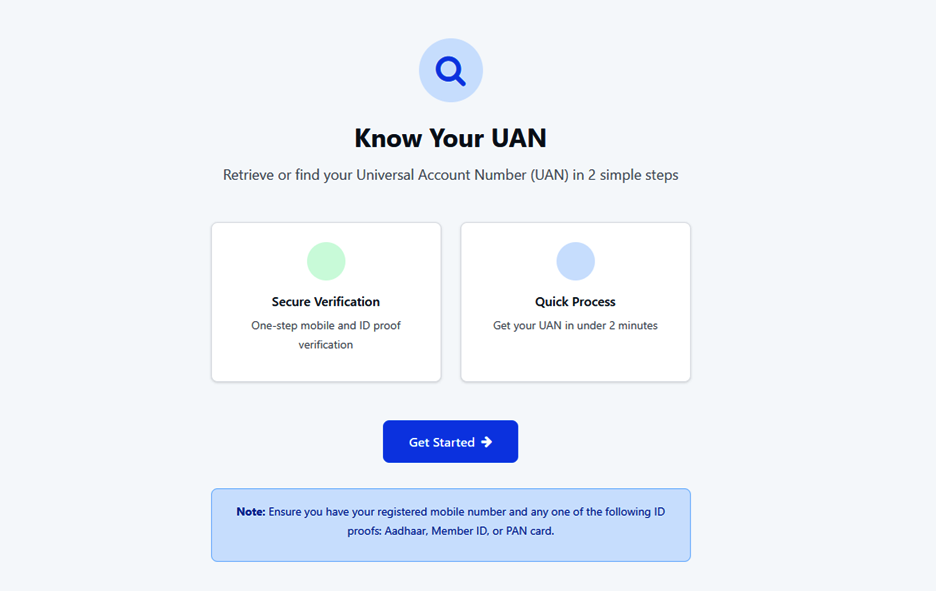
Know Your UAN landing page with Get Started.
Step 2: Verify Your Identity (mobile + ID proof + captcha)
The next screen is Verify Your Identity. A progress bar shows three stages:
| Stage | Label | Meaning |
|---|---|---|
| 1 | Verification | Mobile & ID verification (current step) |
| 2 | OTP | Verify your mobile number |
| 3 | UAN | View your UAN |
Fill the form carefully:
- Mobile Number * — enter the registered mobile number linked with your EPFO / UAN records.
- Select ID Proof Type * — open the dropdown and choose Aadhaar, Member ID, or PAN (as available).
- ID Proof Number * — enter the number that matches the type you selected (Aadhaar number, Member ID, or PAN).
- Captcha — type the characters shown in the captcha image.
- Click Send OTP & Verify.
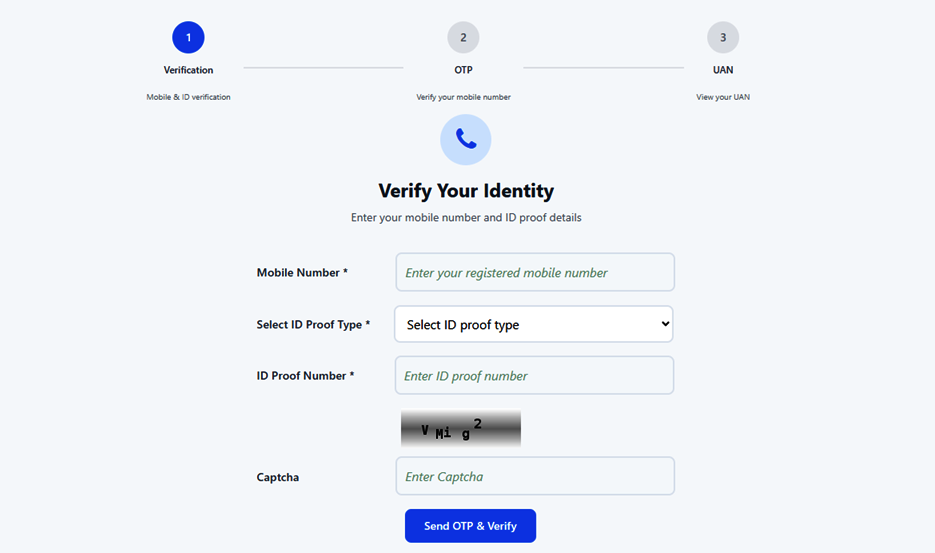
Verify Your Identity form (stage 1 of 3).
Tips for this screen
- Use the same mobile that receives EPFO / Aadhaar OTPs for your PF account.
- Enter ID numbers without extra spaces unless the form asks for a formatted Member ID.
- If captcha fails, refresh the captcha and try once more.
- Never share OTP with anyone claiming to be EPFO support.
Step 3: Complete OTP (stage 2)
- After Send OTP & Verify, the flow moves to OTP — Verify your mobile number.
- Enter the OTP received on the mobile you entered in Step 2.
- Submit / verify as shown on screen.
- If OTP does not arrive, wait a minute, check SMS spam, confirm the mobile is correct, then use resend only if the portal offers it.
Step 4: View your UAN (stage 3)
- After successful OTP, stage 3 — UAN (View your UAN) appears.
- Note the 12-digit UAN carefully.
- Save it securely (password manager or private note).
- Go back to Member Portal login and complete Activate UAN or normal UAN login if you need passbook or claims.
Other ways if online recovery is not enough
From employer / salary slip
- Check recent salary slips for UAN near PF deductions.
- Check joining kit, Form 11, exit documents, or PF emails.
- Ask HR / payroll to share UAN in writing (email preferred).
From an old e-Passbook or SMS
- Open any saved e-Passbook PDF — UAN is often in the header.
- Check older EPFO claim / KYC SMS if UAN was mentioned.
- If you only forgot the password (not the number), use Forgot Password with that UAN.
If the portal still fails
- Recheck mobile and ID digits with HR.
- Retry off-peak if the site is slow.
- Use only contact options published on the official EPFO website.
- Do not create a second UAN through unofficial agents.
After You Recover UAN — What to Do Next
- Activate UAN (if never activated) and set a strong password.
- Complete KYC: Aadhaar, PAN, bank account with IFSC (as required for claims).
- Download e-Passbook and verify employer contributions.
- Only then file online withdrawal / advance or track claim status.
| Goal | Guide on this site |
|---|---|
| Login & activate | UAN Login Online |
| PF balance PDF | EPFO Passbook Download |
| Withdraw / advance | EPFO PF Withdrawal Online |
| Track settlement | EPFO Claim Status Check |
Official Website & Portal Links (Use After the Steps)
Use only these official EPFO domains. Confirm epfindia.gov.in in the address bar before entering mobile, ID number, or OTP.
Opens official EPFO Know Your UAN page directly (free)
🔍 Know Your UAN (Official Direct Link) UAN Member Portal Login EPFO Website Home| Resource | Official link |
|---|---|
| Know Your UAN (direct) | no-auth/uanservice/v2/home |
| Unified Member Portal (login / activate) | unifiedportal-mem.epfindia.gov.in/memberinterface/ |
| EPFO home | epfindia.gov.in |
| EPFO contact / help (as published) | Contact us on EPFO site |
| All EPFO guides on this site | EPFO Services hub |
Common Problems & Fixes
| Problem | What to try |
|---|---|
| No UAN found | Confirm PF is under EPF; try another ID type (Aadhaar vs PAN vs Member ID); ask HR for correct Member ID |
| OTP not received | Use registered mobile only; wait and resend once; check SMS block / network |
| Captcha error | Refresh captcha; type carefully (case as shown) |
| ID type mismatch | Dropdown must match the number you enter (PAN for PAN, etc.) |
| Portal not opening | Retry later, another browser; avoid unofficial mirrors |
| Multiple jobs, confused ID | Prefer Aadhaar if seeded; then link all member IDs under one UAN after login |
Security Tips
- Bookmark only gov.in EPFO links after you finish the steps above
- Never share OTP, password, or full Aadhaar on social media
- EPFO will not ask you to pay for “UAN generation” on private WhatsApp numbers
- After recovery, change password if you ever typed it on a suspicious page
Related EPFO Services
- UAN Login Online
- EPFO Passbook Download
- EPFO PF Withdrawal Online
- EPFO Claim Status Check
- EPFO Services hub
Disclaimer: Portal labels can change slightly. Always follow the live options on epfindia.gov.in domains. Screenshots are for guidance only. This page is a citizen help guide, not an official EPFO notice.